Finding the best WordPress plugin for translation can be surprisingly difficult when so many tools promise fast setup, accurate localization, and seamless multilingual management. For businesses, publishers, and growing online stores, the wrong choice can lead to poor translations, broken user experiences, and unnecessary technical headaches. A multilingual site is not just about converting words from one language to another—it is about delivering clear messaging, preserving brand credibility, and making every visitor feel like the site was built for them.
That is why factors like translation quality, SEO compatibility, ease of use, and site performance matter so much. Some plugins are better suited for manual control and professional localization, while others focus on automation, speed, or budget-friendly scalability. Choosing wisely can affect how well your pages rank in search engines, how efficiently your team manages content, and how smoothly your website performs across languages.
In this article, we will compare the leading options to help you identify the best WordPress plugin for translation for your specific needs. Whether you are building a multilingual blog, business website, or ecommerce store, this comparison is designed to give you the practical insights you need to make a confident, purchase-ready decision.
What Makes a WordPress Translation Plugin the Best Choice?
Choosing the best wordpress plugin for translation is about more than simply converting text from one language to another. The right plugin should support your content workflow, protect your SEO, and work smoothly with the tools your site already depends on. For blog owners, agencies, and online stores alike, the best option is usually the one that balances translation quality, usability, scalability, and technical compatibility.
Before comparing specific tools, it helps to evaluate translation plugins against a few core criteria:
- Translation method: manual, automatic, or hybrid workflows
- SEO features: translated metadata, hreflang support, and indexable language versions
- Performance impact: how the plugin affects page speed and database load
- Compatibility: support for themes, page builders, and WooCommerce
- Ease of management: language switching, editor experience, and update workflow
Manual vs Automatic Translation Capabilities
One of the first things to compare is whether a plugin focuses on manual translation, automatic translation, or a combination of both. This choice directly affects quality, speed, and cost.
Manual translation usually means you or a translator create each language version by hand. This approach is often best when accuracy, brand voice, and cultural nuance matter most. It is especially useful for:
- Marketing pages
- Legal or compliance content
- High-converting product pages
- Industries where terminology must be precise
Automatic translation uses machine translation engines to generate content quickly. It can save significant time and budget, especially for large sites with hundreds or thousands of pages. This is often a practical choice for:
- Large content libraries
- Fast international expansion
- Sites with limited translation resources
For many businesses, the best wordpress plugin for translation is one that supports a hybrid workflow: automatic translation for speed, followed by manual editing for important pages.
SEO, Performance, and Multilingual URL Structure
A translation plugin can either strengthen your international SEO or create technical issues if it handles language versions poorly. Strong multilingual SEO features should include:
- Translated meta titles and descriptions
- Custom translated slugs and clean URL structures
- hreflang tags to help search engines understand language targeting
- Indexable translated pages rather than content hidden behind scripts
URL structure also matters. The best plugins typically support options like /fr/, subdomains, or separate domains, depending on your strategy. In addition, plugin performance should not be overlooked. Some translation tools add database queries, scripts, or duplicate content handling that can slow down a site. A good solution should preserve fast load times and work well with caching and optimization plugins.
Compatibility With Themes, Builders, and WooCommerce
Even the best feature set loses value if the plugin does not work with your actual WordPress setup. Compatibility is essential because modern sites often rely on custom themes, page builders, and eCommerce extensions.
When evaluating options, check whether the plugin supports:
- Popular themes and theme frameworks
- Page builders such as Elementor, Divi, or WPBakery
- WooCommerce products, categories, cart pages, and checkout content
- Custom post types, widgets, menus, and dynamic fields
This is particularly important for stores and lead-generation websites, where broken layouts, untranslated buttons, or missing product data can hurt conversions. The best wordpress plugin for translation should integrate naturally into your existing workflow so multilingual content feels like a feature of the site, not a workaround.
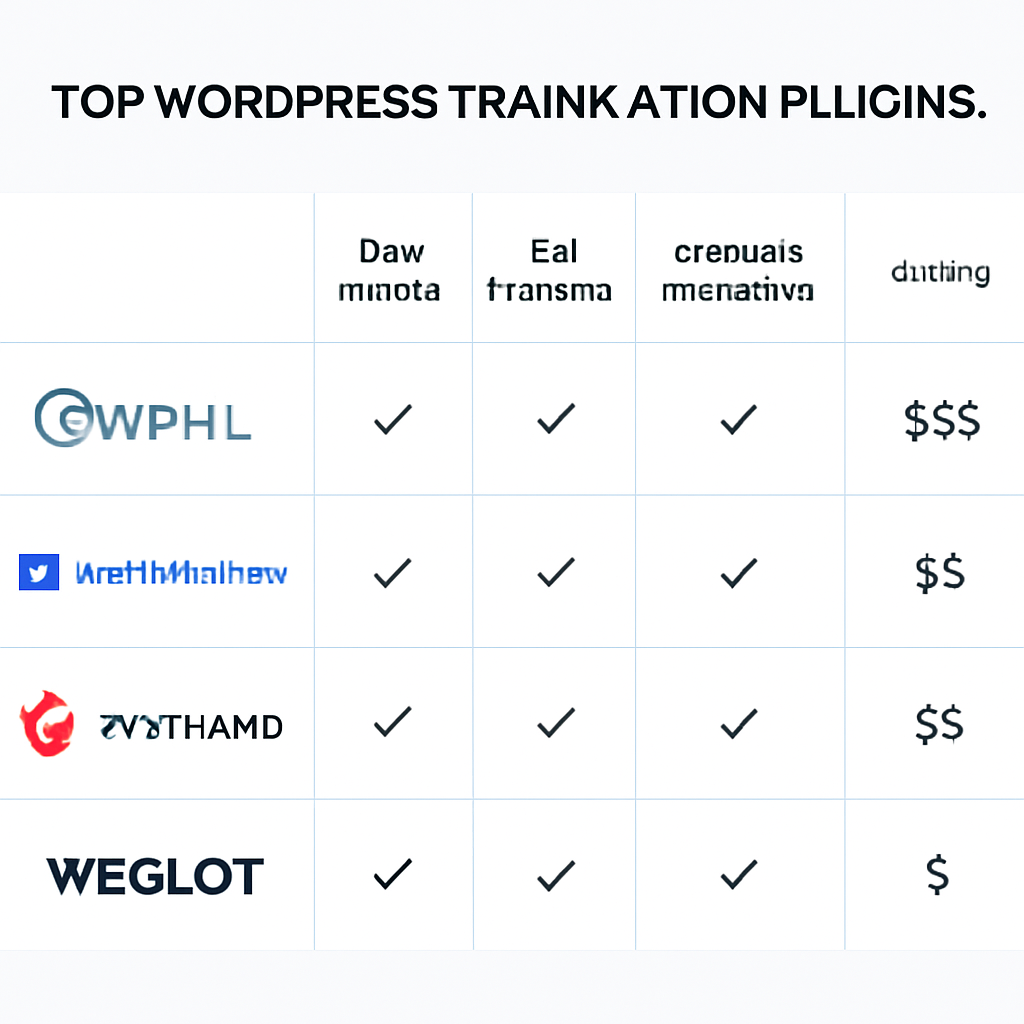
Best WordPress Translation Plugins Compared
When evaluating the best WordPress plugin for translation, most site owners end up comparing a small group of well-established tools. Each plugin approaches multilingual content differently, from deep manual translation workflows to lightweight visual editing and fully hosted systems. The right choice depends on your site size, budget, SEO goals, and how much control you want over the translation process.
WPML
WPML is widely regarded as one of the most comprehensive multilingual plugins for WordPress. It is built for websites that need structured language management, advanced compatibility, and detailed control over translated content. For businesses, publishers, and WooCommerce stores with complex requirements, WPML is often a top contender for the best WordPress plugin for translation.
Its key strengths include:
- Extensive translation management for posts, pages, custom post types, taxonomies, menus, and theme strings
- Team workflows that let you assign translators and manage jobs centrally
- WooCommerce and SEO compatibility for multilingual products, metadata, and URLs
- Professional translation service integration for larger-scale content operations
The tradeoff is complexity. WPML has more settings and a steeper learning curve than simpler plugins, so it may feel heavy for very small sites. Still, if you need granular control and enterprise-level multilingual features, WPML is an excellent fit.
TranslatePress
TranslatePress stands out for its visual, front-end approach. Instead of translating content in the WordPress admin through separate fields, you can translate directly on the page and see changes in real time. This makes it especially appealing for bloggers, service businesses, and small to mid-sized websites that want a more intuitive setup.
TranslatePress is known for:
- Visual translation editing from the front end
- Automatic translation integrations with services like Google Translate and DeepL
- Beginner-friendly configuration with less setup friction
- Good SEO support for translated pages and language-specific URLs
Its main limitation is that advanced multilingual workflows are not as deep as WPML’s, especially for large editorial teams or highly complex content structures. However, for users who want a balance of usability, flexibility, and solid translation quality, TranslatePress is a very strong option.
Polylang and Weglot
Polylang and Weglot are both popular alternatives, but they serve different types of users.
Polylang is a good choice for users who want flexibility and a more native WordPress experience. It allows you to create multilingual content manually and manage languages without being locked into a highly opinionated workflow. It is often preferred by developers and site owners who want control without excessive overhead.
Weglot, by contrast, is built around convenience. It is a hosted solution that handles translation delivery quickly, with minimal setup and fast deployment across an entire site. Its biggest advantages are:
- Speed of implementation
- Simple dashboard and maintenance
- Automatic translation with easy manual editing
- Strong usability for non-technical teams
The downside is ongoing subscription cost and less on-site control compared with self-managed plugins. If you want flexibility, Polylang is appealing. If you want simplicity and rapid launch, Weglot may be the best WordPress plugin for translation for your needs.
Which Translation Plugin Is Best for Different Website Types?
Choosing the best WordPress plugin for translation depends less on features in isolation and more on how well a plugin fits your site’s size, goals, and workflow. A simple portfolio website does not need the same translation setup as a growing WooCommerce store or a multilingual publication with hundreds of pages. The right choice comes down to balancing ease of use, translation quality, scalability, and compatibility with your theme and plugins.
Best Option for Blogs, Business Sites, and Portfolio Websites
For content-focused websites, the ideal plugin should be easy to manage, lightweight enough for everyday use, and flexible enough to translate pages, posts, menus, and basic interface elements without creating a complicated editorial process.
- TranslatePress is often the strongest fit for blogs, agency sites, service businesses, and portfolios. Its visual front-end editor makes translation intuitive, especially for users who want to see exactly what they are translating.
- Weglot is a great option for site owners who want the fastest setup. It is especially appealing for smaller business websites that value convenience and automatic translation over deep manual control.
- Polylang works well for users who want a free or lower-cost solution and are comfortable managing separate language versions of content inside WordPress.
For most of these websites, TranslatePress stands out as the best WordPress plugin for translation because it combines ease of use, manual control, and strong compatibility without overwhelming non-technical users.
Best Option for WooCommerce and Large Content Sites
Online stores and larger websites need more than basic multilingual functionality. They require reliable handling of product pages, archives, metadata, dynamic content, and SEO elements across many translated pages.
- WPML is one of the most robust choices for WooCommerce and enterprise-style WordPress sites. It offers deep translation management, team workflows, and broad compatibility with major themes and plugins.
- TranslatePress is also a strong contender for WooCommerce, particularly for stores that want visual translation and easier day-to-day management.
- Weglot can scale well from a technical perspective, but recurring costs may rise quickly for sites with large volumes of translated content.
If your website includes a large catalog, many landing pages, or a dedicated translation team, WPML is usually the better long-term choice. If you want a simpler interface for managing multilingual store content, TranslatePress may be the better balance.
Best Option for Beginners vs Advanced Users
Some plugins are designed to simplify translation for first-time users, while others offer more complex controls for developers, agencies, or multilingual editorial teams.
- Best for beginners: Weglot and TranslatePress. Both are easy to set up, with less technical friction and faster time to launch.
- Best for intermediate users: Polylang. It offers good flexibility, but users need to be more comfortable with WordPress content management.
- Best for advanced users: WPML. It has a steeper learning curve, but provides stronger workflow controls, custom translation options, and enterprise-level flexibility.
In short, the best WordPress plugin for translation for beginners is usually TranslatePress, while WPML is often the better fit for advanced users who need scalable multilingual infrastructure.
Pricing, Hidden Costs, and Value for Money
When comparing the best WordPress plugin for translation, the sticker price is only part of the equation. A plugin that looks affordable at first can become expensive once you factor in add-ons, machine translation usage, renewal pricing, and the cost of scaling to more languages or higher traffic. For businesses, publishers, and ecommerce stores, evaluating total cost of ownership is far more useful than looking at the entry plan alone.
A smart pricing comparison should consider both current needs and future growth. If your site may expand into new markets, launch more content, or add multilingual SEO requirements, choosing purely on the cheapest monthly or annual plan can lead to higher long-term costs.
Free vs Premium Translation Plugins: Outline what users typically get in free versions versus paid plans, and when upgrading becomes necessary.
Many translation plugins offer a free version, which can be a practical starting point for testing workflows or building a small multilingual site. However, free plans usually come with limits that matter once your website becomes more complex.
Typical free version features include:
- Manual translation for a limited number of pages or posts
- Basic language switcher options
- Support for one or two additional languages
- Core compatibility with standard WordPress themes
In contrast, premium plans often unlock business-critical capabilities such as:
- Advanced multilingual SEO features
- WooCommerce or ecommerce translation support
- Automatic translation integrations
- String translation for themes, plugins, and custom fields
- Translation management for teams or professional translators
- Priority support and regular feature updates
Upgrading usually becomes necessary when your site moves beyond basic blog content. For example, if you need translated product pages, metadata, dynamic content, or scalable workflows, free tools can quickly become restrictive. In many cases, the best WordPress plugin for translation is not the cheapest option upfront, but the one that reduces manual work and avoids technical limitations later.
Machine Translation Fees and Ongoing Expenses: Explain recurring costs tied to automatic translation APIs, word count, hosted services, and multilingual growth.
Automatic translation can save significant time, but it often introduces recurring costs that are easy to underestimate. Some plugins include a limited quota of machine-translated words, while others require separate billing through services like DeepL, Google Translate, or Microsoft Translator.
Common ongoing expenses include:
- API usage fees: Charges based on character count, word count, or monthly volume
- Hosted translation dashboards: Subscription fees for cloud-based management tools
- Additional language costs: More languages usually mean more translated content and higher usage
- Renewal pricing: Introductory discounts may not reflect the long-term annual cost
- Human review: Machine output often needs editing for brand tone, legal pages, and SEO accuracy
Scalability matters here. A site with 20 pages in two languages may stay inexpensive, but a growing store with hundreds of products, blog posts, and regional landing pages can see translation costs rise quickly. Before choosing a plugin, it helps to estimate:
- How much content you publish each month
- How many languages you plan to support
- Whether machine translation will be fully automatic or post-edited by humans
- Which multilingual SEO and ecommerce features require higher-tier plans
The best value comes from matching the plugin’s pricing model to your growth strategy. A slightly higher base subscription may still be the better deal if it includes stronger SEO tools, better compatibility, and lower translation management overhead over time.
How to Choose the Right Translation Plugin for Your Site
Choosing the best WordPress plugin for translation comes down to more than feature checklists. The right option depends on what you publish, how many languages you need, how much control you want over SEO, and whether your team prefers manual translation, automatic translation, or a mix of both. Instead of looking for a one-size-fits-all answer, use a simple decision framework based on your site goals, budget, and technical workflow.
If your website is content-heavy and search visibility matters in every language, prioritize plugins with strong multilingual SEO support, clean URL structures, and compatibility with major SEO tools. If speed and simplicity matter most, a lightweight solution with automatic translation may be the better fit. For stores, product translation, currency support, and checkout compatibility should move to the top of your list.
Questions to Ask Before Installing a Plugin
Before you commit to any tool, ask these practical questions:
- How many languages do you need now and later? A plugin that works well for two languages may become expensive or harder to manage when you expand to five or ten.
- How much content needs translation? Consider posts, pages, menus, categories, product descriptions, custom fields, forms, and media.
- Do you need manual, automatic, or hybrid translation? Manual translation offers more control, while automatic translation speeds up setup and can reduce costs for large sites.
- How important is multilingual SEO? Check support for translated slugs, metadata, hreflang tags, XML sitemaps, and indexable language-specific URLs.
- What is your editing workflow? Some teams want side-by-side translation editors, while others prefer translating directly in the WordPress editor.
- Are you running WooCommerce? Make sure the plugin supports products, variations, attributes, cart content, emails, and checkout pages.
- What is your realistic budget? Free plugins may work for smaller projects, but premium plans often unlock better SEO, automation, and support.
- Will non-technical users manage translations? Ease of use matters if editors or marketers will handle updates regularly.
Quick Recommendation by Priority
If you want a fast answer, here is a practical way to narrow down the best WordPress plugin for translation by priority:
- Best overall: WPML for established multilingual sites that need flexibility, strong compatibility, and advanced content management.
- Easiest to use: TranslatePress for visual translation and a beginner-friendly workflow directly from the front end.
- Best for WooCommerce: WPML or Weglot, depending on whether you want deep control or faster deployment.
- Best budget option: Polylang for site owners who want solid manual multilingual functionality without high ongoing costs.
- Best for fast setup: Weglot for quick launch, automatic translation, and minimal technical setup.
A simple rule works well: choose WPML for depth, TranslatePress for usability, Polylang for value, and Weglot for speed. When you match the plugin to your content strategy and workflow, the final choice becomes much clearer.
Choosing the best WordPress plugin for translation ultimately comes down to how your site is built, how much control you need over the translation process, and how you want to manage multilingual SEO. Some plugins are better suited for manual translation and precise editing, while others stand out for automatic translation, compatibility with popular themes and builders, or streamlined workflows for larger multilingual websites. Pricing, ease of use, language-switching options, and support for ecommerce or advanced SEO features can also make a major difference depending on your goals.
If you run a small business site, blog, or online store, the right solution is the one that fits both your content strategy and your day-to-day workflow. Before deciding, compare the plugin’s translation method, SEO capabilities, performance impact, and long-term scalability so you can invest with confidence. By matching the tool to your site’s needs rather than simply picking the most popular option, you’ll be in a much better position to choose the best WordPress plugin for translation for your multilingual growth.